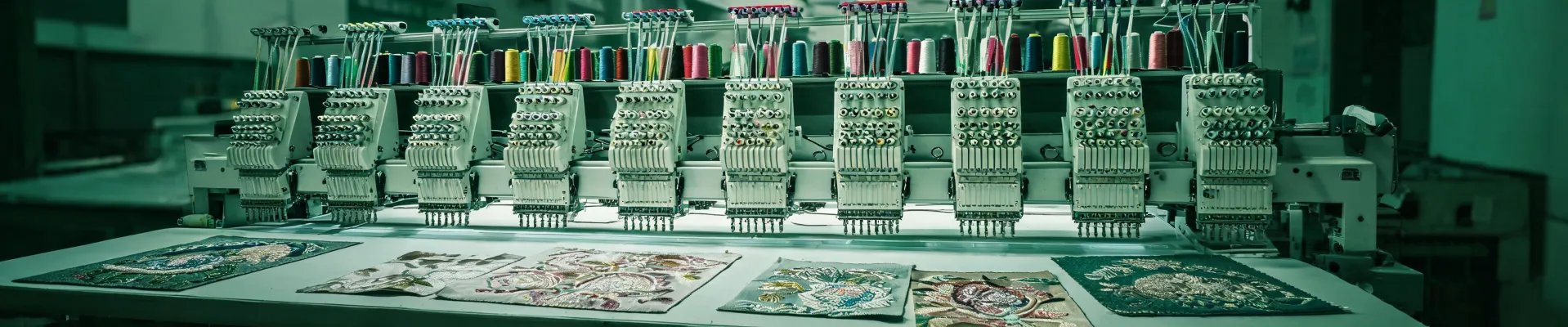
Why Your Barudan 15 Needle Embroidery Machine Breaks Thread on Logo Jobs
Posted on 2026-08-13 by Elise Marceau
At 7:47 on a Thursday, one of the shops I consult for called. Their client's logo was shredding thread on a Barudan 15 needle embroidery machine. The event was Saturday morning. We had 36 hours to fix the file, re-embroider 64 shirts, and ship them 200 miles away.
The order made it. Barely.
That situation has repeated itself more times than I'd like to count. In the last three years, I've helped triage over 200 rush orders for embroidery shops. Thread breaks caused 37 of those. Only four were actual mechanical failures. The rest were bad digitizing, a threading mistake, or a tension issue that snowballed under deadline pressure.
Here's what I've learned about thread breaks on Barudan machines—and what to do before you start replacing parts.
Blaming the Machine Is the First Mistake
When an industrial machine starts snapping thread, the easiest thing in the world is to blame the brand. I've done it. But Barudan machines don't randomly decide to hate a logo. They repeat what the file tells them to do.
What most people don't realize is that a multi-head machine will reproduce garbage perfectly. If the file has a sharp turn in a satin column, the needle will pull the same thread at the same angle on every head. It will break. Then it will break again. That's not a mechanical fault. That's a command problem.
A Barudan logo might look simple on screen. Once it's been converted to stitches, it can have density changes, underlay gaps, and stitch angles that fight the fabric. The machine just follows the path.
The Real Problem Is Digitizing
You can't take a vector logo and stitch it directly. Embroidery is physical. Needles punch holes. Thread has to bend. Fabric has to recover. A digitizer's job is to turn a flat logo into a set of commands that respect density, underlay, pull compensation, and stitch angle.
If the file treats all fabrics the same, thread breaks are the most visible symptom.
Here's something vendors won't tell you: digitizing software can produce a file that looks perfect on the screen. The screen doesn't have tension. The screen doesn't have a needle bar moving at 750 stitches per minute. The screen doesn't care that a file has 40,000 stitches of dense satin in a logo that should have been 8,000.
The question everyone asks is "which machine should I buy?" The question they should ask is "who's doing the digitizing for that machine?" A Barudan, a Vango, or any other multi-head can't save you from a bad file. The digitizing embroidery machine (and by that I mean the software plus the person running it) matters more than the head count.
Color Is Also a File Problem
Color changes are another place thread breaks hide. If the logo has a corporate blue that's actually Pantone 286 C, the digitizer needs to map it to the closest thread color. According to Pantone's Color Matching System guidelines, the acceptable tolerance for brand-critical colors is Delta E below 2. Thread vendors provide conversion charts, but those are starting points. The real test is a stitch-out on the actual fabric.
A skip in the color-change sequence can cause the machine to trim and then pull thread through a blocked needle. That's not a needle issue. It's a file issue.
Same Story on a Vango Embroidery Machine
I keep mentioning Vango embroidery machine because people assume a different model means a different failure profile. It doesn't. If you load the same badly digitized logo onto a Vango, it will break thread in the same spots. The machine is executing instructions. It doesn't know that the file was supposed to be different.
One of my biggest regrets: we once loaded a rush file onto a Vango without doing a single-head test. The client needed 36 jackets in 48 hours. The file was too dense for the twill fabric. We lost half a night before we figured out that the problem wasn't the Vango—it was the file. We rebuilt it, but the overtime cost more than the digitizing would have if we'd done it right the first time.
Start With the Basics: Thread Path and Tension
I know "how do you put thread in a sewing machine?" sounds like a beginner question. But I've seen experienced operators skip the basics and spend hours swapping parts on a $30,000 machine.
On a 15-needle machine, one misrouted spool can cause problems on every color change. The thread has to travel through the tension disc, the take-up lever, and the needle in the exact sequence. If it's not seated correctly, you'll get intermittent tension that looks like a mechanical issue.
So before you call a technician, check the obvious. Is the spool cap matched to the cone size? Is the thread in the tension disc? Is the needle installed correctly? Is the bobbin wound evenly? The answer to "how do you put thread in a sewing machine?" has to be second nature, because when you multiply it by 15 heads, a small mistake becomes a production delay.
What a Broken Logo Order Actually Costs
It's never just the $900 order. It's the thread, the hats, the labor, the express freight, the apologetic email. In March 2024, a shop paid $260 in urgent shipping to deliver a late logo order, then discounted the invoice by $200 to keep the account. The customer stayed. The job didn't make money.
I had two hours to decide whether to trust a new digitizer with a $6,000 order. Normally I'd run a test sample first, but there was no time. The account manager was waiting. I took the gamble. The file broke thread on head three and head seven. We paid $800 in overtime and ended up rebuilding the file ourselves.
That's the decision pressure that causes most production mistakes. You're not choosing between a good option and a bad option. You're choosing between a risky option and a worse option.
The Fix: Rebuild the File, Not the Machine
Once thread breaks are traced to a bad file, the solution is simple in theory: rebuild the file. But under a deadline, "simple" doesn't mean "easy." Here's what works when I'm triaging a rush order:
- Get the file rebuilt by a digitizer who knows multi-head machines. Not just embroidery in general—multi-head, 15-needle, production speed.
- Run a single-head test on a sample of the actual fabric. This catches density, tension, and color-change issues before the whole run.
- If the client's logo has small text, push back. Tiny serif text on a hat won't stitch cleanly, no matter what the file says.
- Build a 48-hour buffer into the schedule. I know it's not always possible, but after three failed rush orders with zero buffer, our shop policy changed. Now every promise includes a "worst case" clause.
That last one is hard. Clients don't want to hear "48-hour buffer." But a client would rather hear "we delivered early" than watch their event shirts fail on a loading dock.
If You're Shopping for a Machine
If you're looking at a Barudan 15 needle embroidery machine or a Vango embroidery machine, buy the one that fits your production needs. But budget for digitizing like it's part of the machine. You can buy the best multi-head in the industry, but if you skip digitizing, that machine will cost more in lost production than a less expensive machine with a digitizer on call.
Thread breaks are a signal, not the problem. On most logo jobs, the signal points to the file. The machine is just the messenger.
And if you're standing in a dark shop at 9 p.m. wondering "how do you put thread in a sewing machine?"—start there. Then check the file.

Elise Marceau
Elise Marceau is an LED display and digital-signage systems analyst covering LED video walls, modular screens, transparent LED, control processors, and indoor or outdoor signage. She applies IEC 62368-1 safety principles while comparing pixel pitch, luminance, contrast, refresh rate, colour uniformity, viewing angle, ingress protection, power density, module serviceability, and signal redundancy. Her specification guides help integrators, venue operators, retailers, and procurement teams align viewing distance, ambient light, content format, installation access, electrical load, and lifecycle support.